Search history
Clear allSearch by image
XDrag and drop an image here or upload an image
Max 5MB per image
UploadSign In | Join

Search history
Clear allSearch by image
XDrag and drop an image here or upload an image
Max 5MB per image
UploadSign In | Join
X Email Mobile
Price Negotiable


A new item has been added to your Shopping Cart. You now have items in your Shopping Cart.
TH12 AF1HWireless RF dimmerPossesses the capability of adjusting the brightness without steps.LEDDimming controller. It is controlled by wireless radio frequency remote control, allowing users to adjust the light brightness to the appropriate level from a distance according to their actual needs.
.Technical parameters
Model:TH12 AF1H
●Working temperature: -20 to 60"℃" is the symbol for Celsius temperature scale.
●Supply Voltage: DC5V, 12V, 24V optional (please specify the required voltage when ordering)
●Output: 1"回路"可以翻译为 "circuit".
●Dimensions: L82ΧW56.5ΧH34 mm
● Packing Size: L122×W85×H42 mm
●Output Current: <8A
●Output Power: 5V
. Dimensions:
Controller size:

Remote control size:

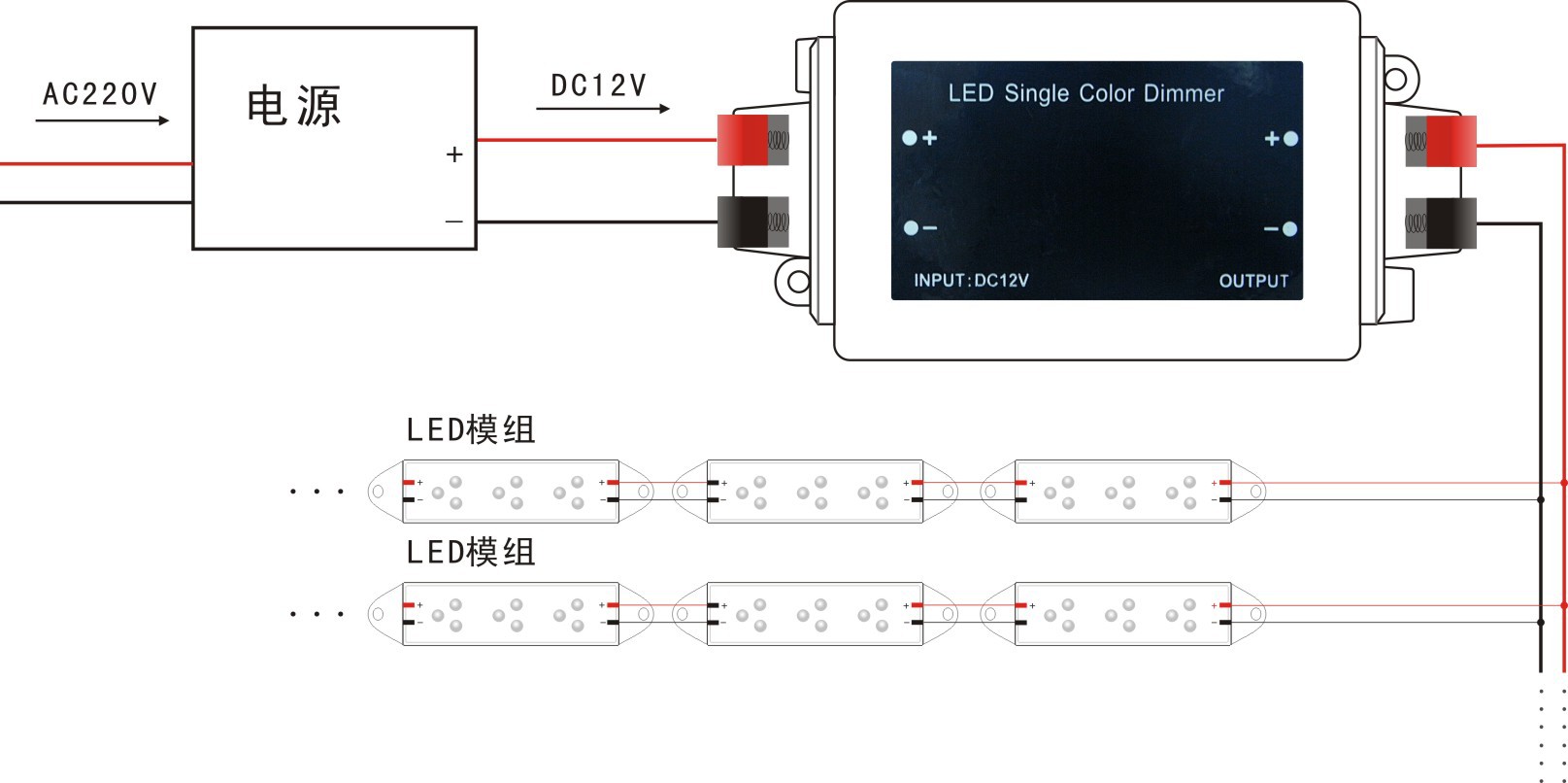
.DimmerConnection Diagram
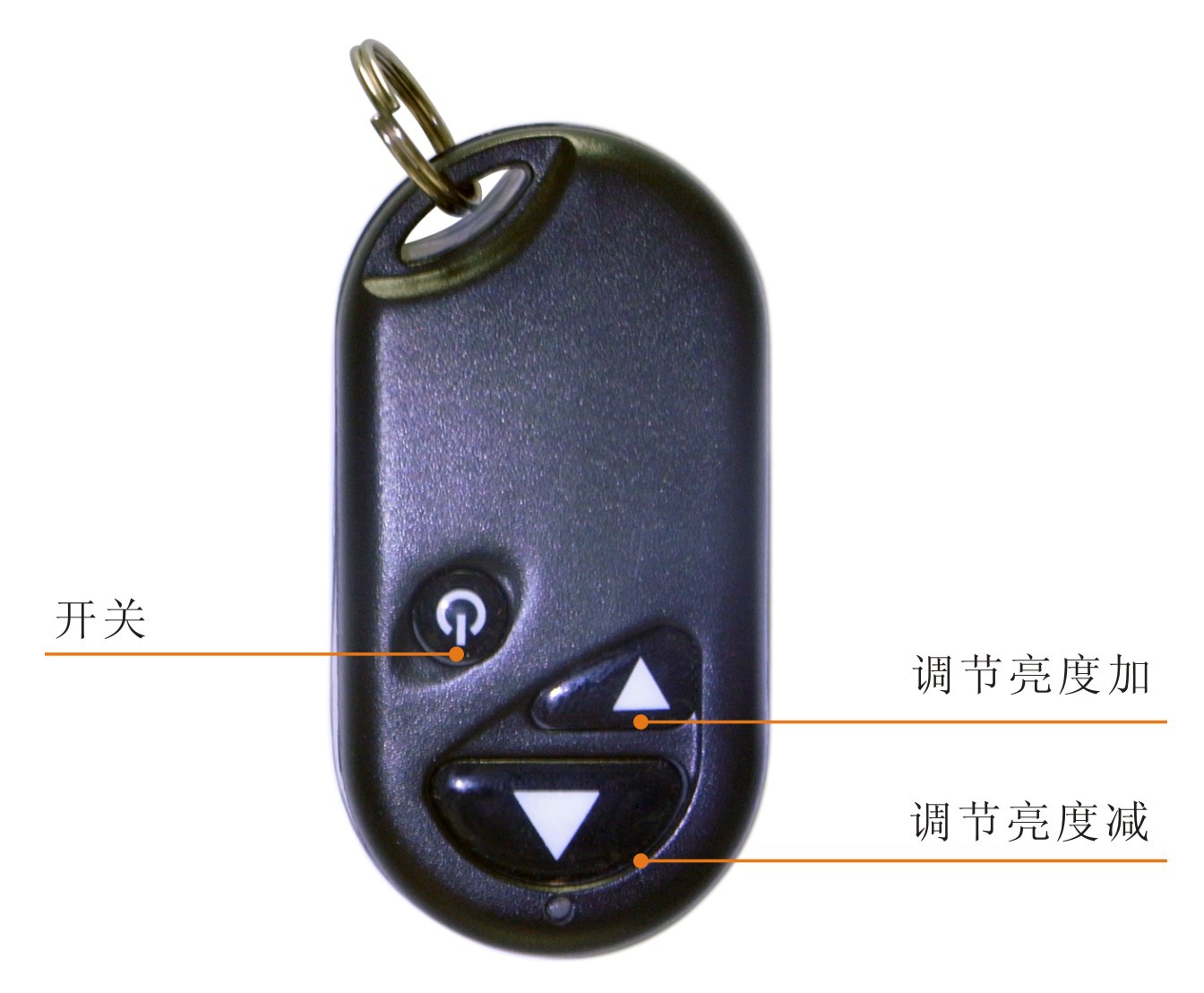
Remote Control Button Function Description:
|
TH12 AF1HButton Name |
Functional Detailed Description |
|
|
|
Switch Button |
Close or open the controller. |
|
|
Dimming Button |
Press this button to increase the brightness. |
|
|
Dimming Button |
Press this button to dim the brightness. |
Instructions for Use:
1.First connect the load line, then connect the power line; Ensure there is no short circuit between the connecting lines before turning on the power.
2andWireless remote control is used for control, with the following functions:
To increase brightness, press the brightness up key; to decrease brightness, press the brightness down key.
ON/OFF is the power switch.
Fault Analysis and Solution:
|
Fault Phenomenon |
Reason Analysis |
Solution |
|
The light doesn't work. |
1. The switch power supply is not working. 2. The positive and negative lines of the power supply are connected in reverse 3. Pressed the wrong wire or not connected firmly |
1. Check the switch power supply 2. Check and correct it. 3. Check the wiring and connect it securely. |
|
The color is wrong |
RGB cable is connected incorrectly |
Recheck and reconnect the RGB wires. |
|
The pattern does not change. |
The speed hasn't been set correctly. |
Press the speed key to increase speed. |
|
before and after LED brightness unevenness |
1. Output line has too much voltage drop 2. The wire diameter is too thin, causing a voltage drop. 3. Power load overload 4. Controller Load Overload |
1. Shorten the circuit or provide power in a ring shape. Calculate the current and replace the thicker wire. 3. Change to a more powerful power supply 4. Increase the power expander |
|
Warm Tip: The effective power of switch mode power supply is only 80% of the rated power, so when choosing the power supply, the user should select a slightly larger power than the LED load, at least more than 20%. |
||
Update time:


TOP