
Search history
Clear allSearch by image
XDrag and drop an image here or upload an image
Max 5MB per image
UploadSign In | Join

Search history
Clear allSearch by image
XDrag and drop an image here or upload an image
Max 5MB per image
UploadSign In | Join
|
vibration model without battery
震动款 不含电池 |
CN¥ 22.0 |
|
non-vibrative without battery
无震动 不含电池 |
CN¥ 20.0 |
Yiwu Aihui Electronics Co.,Ltd 8yr.
Contacts Chen Sihui Chat
Mobile 86-18267087326
E-mail 1076537522@qq.com
18267087326

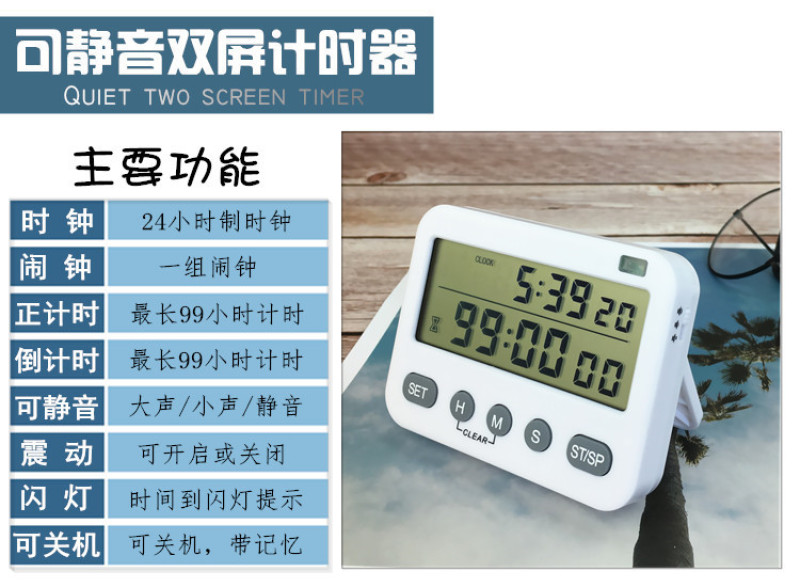
Name: YS-218 Dual-Screen Timer
Function: Clock/Alarm/Stopwatch
Size: 84x65x17mm
Display: 70x30mm
Toggle Mode: Voice/Vibration/Flashlight
Sound: Adjustable volume/mute
Battery: 2 AA batteries
Single product weight: 78g
Cubic Volume: 0.033m³/120pcs
Cubic Volume: 0.033m³/120pcs
Product features and specifications:
1. Product features: Clock, alarm (24-hour format), and countdown/countup function (up to 99 hours, 59 minutes, and 59 seconds).
2. Prompt Method: Voice Prompt, Flashlight Prompt, Vibration Prompt (Alarm Mode: Press the HM Key to Turn On or Off Vibration Simultaneously)
Note: This setting is only available for models with vibration, and it is not available for models without vibration.
3. Standby Mode: Press the SET key continuously while holding down the ST/SP key to enter the standby mode. Any key can be pressed to wake the device from the standby state.
Product Settings:
1. Clock (24-hour clock)
Clock mode, press the SET key for 2 seconds, hours, minutes, and seconds flash, press the H, M, S keys to set the hour, minute, and second parameters (you can press and hold to quickly increase), press the SET key to save and exit the setting.
2. Alarm clock (daily alarm, 24-hour format)
Alarm mode, press the SET key for 2 seconds, the hour, minute, and second display flashes, press the H, M, S keys to set the hour, minute, and second values (you can press and hold to quickly increase), press the SET key to save the setting and automatically turn on the alarm. After the alarm is turned on, the alarm sign is displayed. To turn on or off the alarm in the alarm mode, press the ST/SP key.
3. Countdown function (countdown operation is only available in clock mode)
Press the H, M, or S buttons to set the hour, minute, or second values (you can press and hold for rapid increase). Press the ST/SP button to start or pause the countdown (it flashes when the countdown starts). To reset the countdown while paused, press the H and M buttons simultaneously. When the countdown ends, it starts the regular time and gives a 1-minute prompt. You can press the ST/SP button to end the prompt and return to the original setting.
The countdown function (can only be operated when in clock mode)
Press the ST/SP key to start or pause the countdown (the countdown will flash when it starts), and to reset the countdown while in the pause state, press the H M key simultaneously.

Update time:


TOP


