
Search history
Clear allSearch by image
XDrag and drop an image here or upload an image
Max 5MB per image
UploadSign In | Join

Search history
Clear allSearch by image
XDrag and drop an image here or upload an image
Max 5MB per image
UploadSign In | Join
X Email Mobile
Yiwu Sanqi Electronic Monitor Firm 14yr.
Contacts 蓝岩敏 Chat
Mobile 86-13373825691
E-mail 61610307@qq.com
13373825691

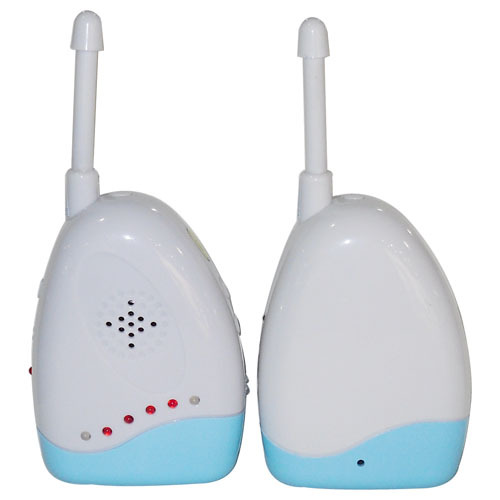
1. Use frequency hopping spread spectrum technology ( FHSS), strong anti-interference ability and clearer sound quality.
2. work frequency band900MHZ ISM,905-925MHZ
3. Long-distance transmission, open200-300 rice
4. Supports one receiver and two transmitters, AB which transmitter is selected by the switch
5. Transmitting and receiving can only work after code matching, with strong confidentiality
6. Can be supported at the same time60 users use each other at the same time without interference.
7. With temperature, bed-wetting, vibration alarm function
Function description
A: transmitter function description

1: Antenna
2: LOW/POWER two-color indicator light, low voltage/ the function of the work and code alignment indicator is as follows:
● green indicator light is on: Yes DC power supply or boot battery power supply is normal;
● The red indicator light is on: the power-on battery is low;
● green indicator light flashes: the code matching status; The code matching indicator light received after the code matching is turned off. At this time, press the transmitting power supply briefly./ match the code key
3: C harge charging indicator light, when charging, the light is on, full or not connected to the battery light is not on
4: DC6V DC power input
5: Wet sensor wired urine sensor interface
● The child received an alarm sound and after bed-wetting is detected. LED light flashing indication, receiving stop alarm after wet urine is relieved
6: microphone head, pick up the sound signal of the transmitter
7: Power/Code power supply/ code switch
● Short press on/ shutdown
● Press the code pair for a long time under the shutdown, and the green light of the two-color light flashes.
8: temperature sensor, the temperature of the transmitter exceeds40 degree or lower0 after the degree, the receiver will alarm and LED flashing indication
9: battery door, inside3 festival AA battery
B: Receiver product function description
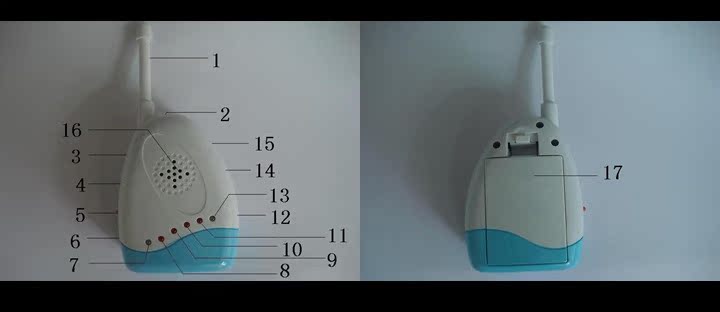
1: Antenna
2: Power/Code: power supply/ code switch
● Short press on/ shutdown
● Press the code pair for a long time under the shutdown, and the green light of the two-color light flashes.
3: Vibe vibration setting button to set the sensitivity of vibration alarm
4: A/ B channel switching switch, you can switch the transmitter of two different channels
5: Charge charging indicator light, the light is on when charging, full or not connected to the battery light is not on
6: DC6V DC power input
7: Two-color indicator light, working normally/ code matching indication
● green: long light, normal online; Flashing, the code status, the green light goes off after the code is good, and the red light is on. At this time, press the power source./ the code matching key is successful, and the green light will turn long.
●Red: Cannot be Online normally;
8,9,10,11:4 level volume and alarm indication function
12: Vibe ON/OFF vibration function on/ turn off, turn on, and turn off the vibration alarm function
13: two-color indicator light, battery low voltage indication.
14: VOL -: volume reduction
15: VOL+: volume Plus
16: Horn
17: battery door, inside3 connection AA battery
Instructions
1: switch on or off
Transmit and receive the power supply according to the correct method, or install the battery to supply the power, respectively, short press the transmit and receive power supply/ turn on or off the code switch button
2: Code operation
4.2.1: switch the received channel on A or B(Determine which channel to set the launch) to hit A channel as an example
4.2.2: in the receiving shutdown state, long press the power supply/ code matching switch about2 after seconds, code matching/ the working indicator light (the first double-color light on the left of the receiver) blinks slowly, indicating that the code matching status is entered.
4.2.3: After receiving the code matching status, press and hold the transmitted power supply in the transmitter shutdown status./ code matching switch about2 after seconds, the receiver blinks the code indicator quickly, then the green light goes off, the red light is on, and the emitted green light flashes slowly, indicating that the code pair is successful. At this time, you need to press the transmitter short to end the code pair and enter the online state.
4.2.4: Duplicate4.2.1-4.2... 3 complete the steps B code matching operation of the machine
Note: it is OK to launch or receive the code before the code is matched. After the code is matched, you must press the transmitted code briefly./ you can confirm that the code matching is successful and the code matching is completed only when the power is turned on. The code is saved until the code is re-matched.
3: Volume Adjustment
● total volume series5 level
● press VOL+ volume plus button, increase volume,4 the volume indicator will also indicate the corresponding volume level. When the volume is adjusted to the maximum, it will send a "beep".. The sound of "du" indicates that the volume is already the highest.
● Press VOL- volume reduction button, volume reduction,4 the volume indicator will also indicate the corresponding volume level. When the volume is adjusted to the maximum, it will send a "beep".. The sound of "du" indicates that the volume is already the lowest.
● LED light indicates the volume:8,9,10,11 the light is on, the volume is the largest, the volume is all off, and the volume is the smallest.
4: vibration level setting
● Press and hold Vibe vibration setting button2 if you do not play in seconds, the system will make a sound of "Toot", indicating that the vibration level setting is entered, which is divided4 level
● Continue pressing Vibe vibration key, press at the same time VOL+ and VOL- adjust the vibration level at the same time8--11 LED the lamp indicates the vibration level. The more the lamp is on, the lower the vibration sensitivity is, and the higher the other way around. When it is set to the highest or lowest, the system will send a "du".. The sound of "du" indicates that the vibration level has been the highest or lowest.
5: vibration switch settings
● toggle Vibe ON/OFF vibration switch, ON when there is a sound at the transmitter, there will be a vibration prompt, OFF turn off vibration alarm
● when the vibration switch is on ON when the volume of the transmitting end is greater than the vibration level set by the receiving end, the receiving end will send a vibration alarm, prompting parents to check. If the vibration is triggered continuously, the vibration alarm interval5 send a vibration alarm in seconds.
6: online operations
● by selecting the receiver's A/ B switch, select the transmitter is the code pair in A or B channel
● the online is normal, and the green light of the code indicator will be on (receiving the first light on the left of the front)
● the online connection is abnormal, and the red light of the working code indicator will be on (receiving the first light on the left side of the front), and the receiving end will be on every interval.20 send an alarm tone of "Toot" in seconds to prompt the user.
7: mute function
● When the transmitter is continuous20 when no sound is made in seconds, the receiver will enter the mute state.
8: temperature, humidity alarm function
9: Low Voltage indication and charging indication
● when the battery voltage of the transmitter and receiver is as low as about3.4V the low-voltage indicator light will luminous red.
● when the system is inserted6VDC when the power supply charges the battery, the charging indicator light transmitted and received is on, and the charging indicator light is full and off.
Note: rechargeable batteries can only be used3 festival1.2V AA ni-Mh rechargeable battery, in use ordinary AA do not insert an external power supply into the dry battery to avoid danger!!!
Problem Diagnosis and troubleshooting
1: cannot be turned on
Check whether the power supply or battery is connected properly, whether the battery has electricity, and whether the DC power supply AC terminal is in good contact with the mains interface.
2: Cannot be Online
Toggle the received AB switch to see if the channel selection is wrong. Follow the code matching instructions again to see if the problem is solved.
Product Parameters
Working frequency: ISM905-925MHZ
Transmit power: 10dBm
Modulation mode: FSK
Spread Spectrum: FHHS
Audio encoding method: ADPCM
Modulation frequency offset: 180kHz
Code rate: 500kbps
Receiving sensitivity:...-92dBm
Power supply mode: 6V DC and 3 AA Batteries
Transmitter work current :80MA MAX
Transmitter standby current: 100UA MAX
Receiver work current :140MA MAX
Receiver standby current: 100UA MAX
Charging current: MAX 80MA
Battery Specification: 3 1.2V AA Ni-MH rechargeable batteries
Operating temperature: 0°C-50°C
Precautions
1: when not in use for a long time, please pull out the battery or pull out the external power supply
2: when using ordinary AA batteries, please do not use external power supply and batteries at the same time to avoid danger.
3: the rechargeable battery can only use 1.2V AA Ni-MH battery. Please do not charge the external power supply all the time when it is not used for a long time, so as not to reduce the battery life.
4: do not use in high temperature and high magnetic field
Product Accessories
1: one transmitter
2: a receiving host
3:1 receiver AC adapter (6V/500mA DC)
4:1 transmitter AC adapter (6V/500mA DC)
5. A manual
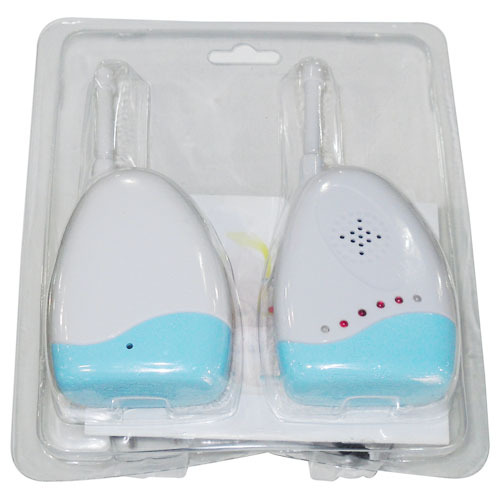
Sound transmission set
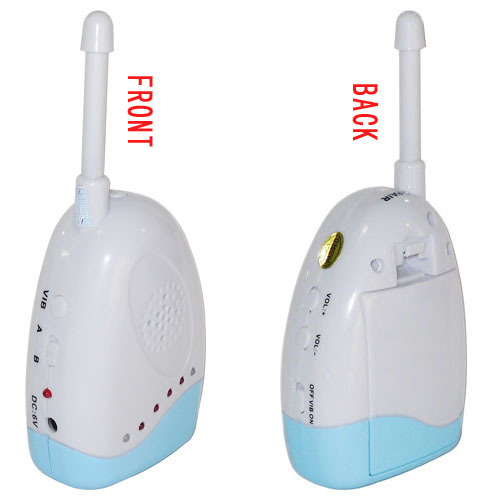
Sound transmission front and back
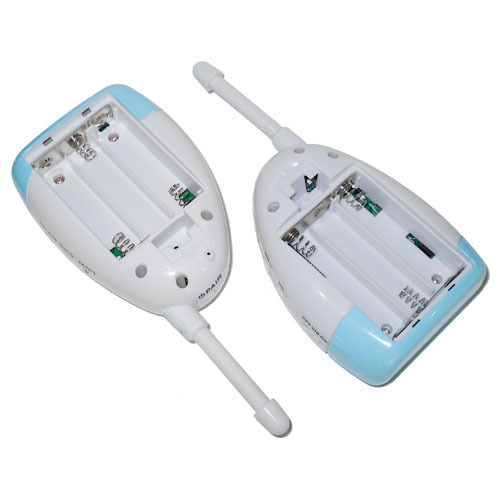
Battery compartment
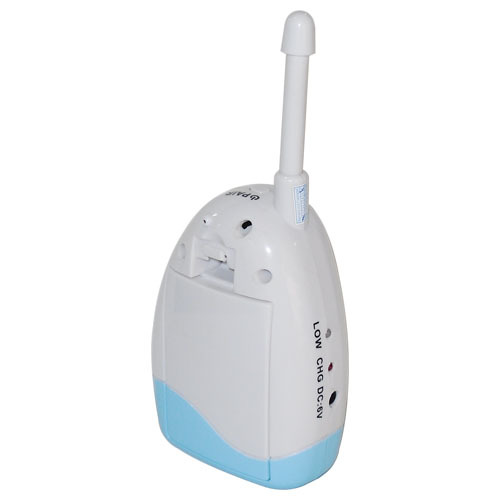
Back of host
Packaging
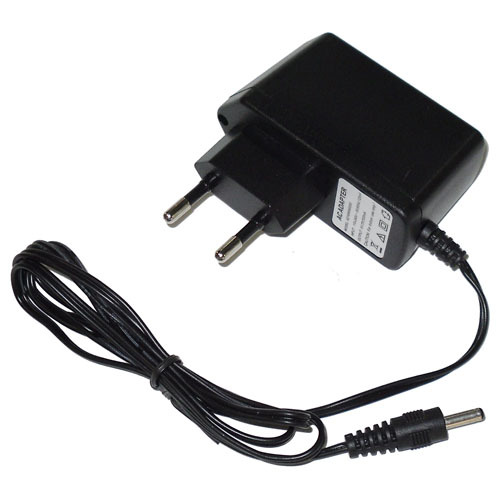
Power X2
Update time:


TOP


