Search history
Clear allSearch by image
XDrag and drop an image here or upload an image
Max 5MB per image
UploadSign In | Join

Search history
Clear allSearch by image
XDrag and drop an image here or upload an image
Max 5MB per image
UploadSign In | Join
X Email Mobile
| Number | Unit-price | Total | |||
| I want to buy: | × | 12.0 | = | 0 |


A new item has been added to your Shopping Cart. You now have items in your Shopping Cart.
宝贝描述:
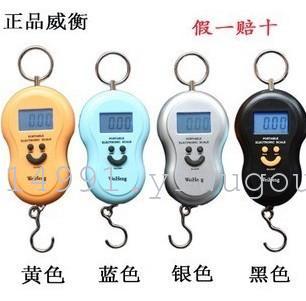
【Weight】: 125g
Peel/Reset:
Weighing:
Unit Conversion:
Shutdown:
Notes:
【Size】: 11.5×7×2.5cm (scale body) LCD screen length: 3.7cm
【Unit】: kg (kilograms), lb (pounds), oz (ounces), switch between the three units at will.
【Equipment】: Hand-held scale, 2 AA batteries.
【Description】: This product features a sleek design, convenient portability, accurate weighing, stable and reliable performance, and high cost-performance ratio. It includes features such as skin removal, zero tracking, automatic power-off, and unit conversion, making it an ideal choice for the next generation of weighing products. It is a must-have tool for Taobao sellers and courier services.
Power on:
Hang the electronic scale, making it in a vertical position, press the 'ON/OFF' key to turn on the machine, the display window shows (88888), and the beeper makes a start-up prompt sound, about two seconds later, the display window shows (0.00 or 0.000). At this time, the hand scale completes the initialization and enters the weighing state.
When weighing bulk items in a container, you can first place the container on the scale, press the "TARE" key, and wait for the weight window to display zero. Then, you can load the items and weigh them to obtain the net weight of the items.
After turning on the machine, hang the item on the scale, and the weight of the item will be displayed immediately. When the item on the scale stabilizes (stops swaying), the weight value is locked, and the beeper will emit a locking prompt sound and display the locking symbol (HOLD). At this time, you can unlock the scale by pressing the "ON/OFF" key to weigh again. When weighing, the weight of the added item (including the skin weight) must not exceed "the maximum weighing + 9d" (10kg: d=5g; 20kg: d=10g). If the value exceeds the above, the overloading symbol "Err" will be displayed, and an alarm sound will be emitted.
Press the "UNIT" key, the electronic scale will rotate between kg (kilograms), lb (pounds), and oz (ounces) units for conversion (1 kg = 2.2 lb = 35 oz).
Under the weight state (unable to turn off under initialization), turn off the power by pressing the 'ON/OFF' key when not locked; when locked, unlock by pressing the 'ON/OFF' key first, then turn off the power by pressing the 'ON/OFF' key again; or the electronic scale will automatically turn off after 90 seconds of inactivity.
1. Each time the computer starts, the electronic scale should be in a vertical position.
2. Please hold the hook or add auxiliary tools on the hook to weigh, do not hold the shell to weigh, otherwise it will lead to the error of the weighing display exceeding the standard.
3. Avoid violent collisions and impacts as much as possible during use.
4. The electronic crane scale shell is made of ABS engineering plastic. Please use soft cloth mixed with clean water or detergent to wipe it clean. It is strictly prohibited to clean it with benzene, nitro-type solvents, alkaline liquids, and other corrosive substances.
5. If the low battery indicator is displayed, please replace the battery in time. If the electronic scale is not used for a long time, remove the batteries to avoid damage to the circuit due to battery leakage.


Update time:


TOP