
Search history
Clear allSearch by image
XDrag and drop an image here or upload an image
Max 5MB per image
UploadSign In | Join

Search history
Clear allSearch by image
XDrag and drop an image here or upload an image
Max 5MB per image
UploadSign In | Join
Wangshun Auto Products Firm 15yr.
Contacts ZhouJun Chat
Mobile 13958430822
WeChat 13958430822


Button Function Description:
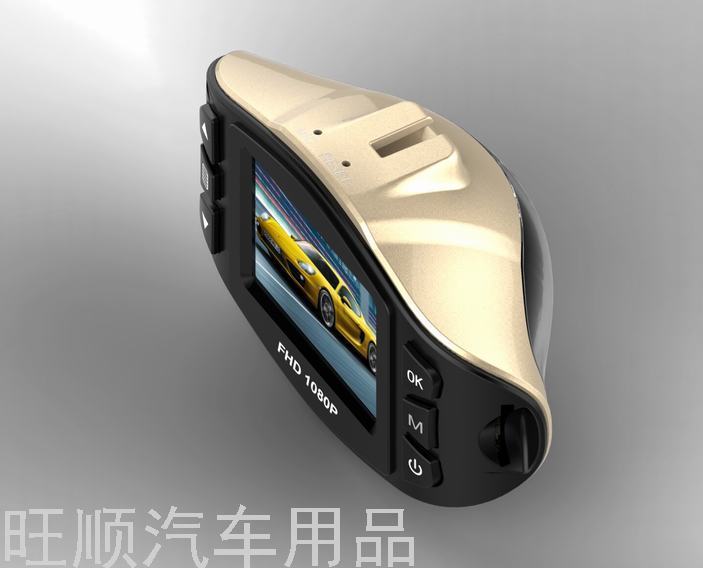
l 1Up Select Button
Press this button briefly during standby or recording to adjust the digital zoom;
In the menu options, the down adjustment function key;
l 2Menu Button
Press this button briefly to call up the function setting menu.
l 3Down Arrow Button
Press this button briefly during standby or recording to adjust the digital magnification.
In the menu options, select the down arrow key to select the function.
l 4)USBData Interface
USBData Interface①used for connectingPCTransfer data;②Used to connect to an external power source to charge a battery or provide operating power.
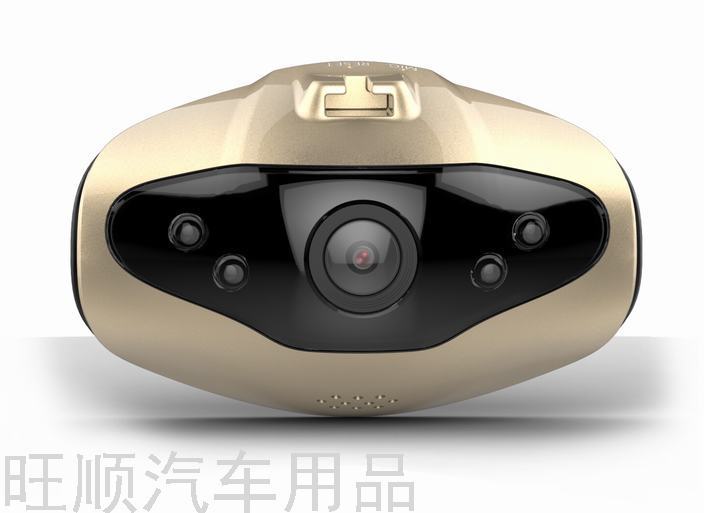
l 5lens
Camera Lens
l 6horn
Video replay sound monitoring, operation sound reminder"";
l 7)OKConfirm Button
Record and take a photo button. In video recording mode, press this button briefly to start recording, and press it again briefly to stop recording. In photo mode, press this button briefly to take a photo.
In menu mode, the button is for confirmation.
l 8)MODEMode Selection Button;
Press this button to switch to the camera mode.—take photos—Switch between each other in replay mode.
SOSFunction: Press this button briefly during video recording to forcibly save the current video.
l 9)POWER ON/OFF
Power switch: Long press to turn onSlashShut down; Press briefly to turn on or off the flashlight
l 10Display screen
Photography and video shooting viewfinder display;
l 11)TFCard slot
SD card slot
l 12)LEDInfrared Light
Night vision infrared light can be turned on by pressing the power button briefly."";
l 13Support Installation Position
Car mount installation position;
l 14Reset Hole
Press this key briefly to reboot when the machine is turned off.
l 15)MICReceiving hole
Recording Receiving Hole
Special Feature Instructions:
l G-sensorFunction
When the gravitational acceleration reaches6g(1g=9.80mSlashsecondsquared" 或 "cubeWhen the incident occurs, the machine will automatically save the current video of the accident as an irrecoverable file.
Optional
l Automatic OpenSlashShut down
Supports connecting to the vehicle's power source, which allows the car to start and automatically turn on the recording function upon ignition, and to save the recording upon shutdown and turn off the device.
l no missed seconds
l SOS
Video recording short pressKey, can force save the current video;
cameraSlashBasic Operation Instructions for Taking Photos:
l Power on and power off
Long PressPOWER ON/OFFPower button to turn on the computer, the blue indicator light will turn on when the computer is turned on.
Long press againPOWER ON/OFFThe power button is for turning off the device, at which point the blue indicator light will turn off.
Note: The recorder will automatically turn off after a low battery warning and when the battery voltage is low.
l Camera Mode
short press “MPress the "*" key to switch to the camera mode, and the camera icon will be displayed in the upper left corner of the screen.
short press “OKPress the "Start Recording" button to begin recording, and the recording icon will flash with a red dot, indicating that the recording is in progress.
l Photography Mode
short press Press the """ key to switch to the photography mode, and the photography icon will be displayed in the upper left corner of the screen.
short press “OKPress the '' key to take a photo, and the screen will flash once to indicate that the photo has been taken.
l VideoSlashPhoto Review
Short pressMPress the """ key to switch to the replay mode, and the replay icon will be displayed in the upper left corner of the screen.
short pressThe key can be used to select files upwardly.
short pressThe key can be pressed to select a file downward.
short press “OKPress the 'Play' button to start playing the selected video file.
l Menu Settings
Press the "Menu" button briefly to enter the video setting state, and the "Video Icon" column will be in yellow background; press the "Menu" button again briefly to switch to the setting state, and the "Setting Icon" column will be in yellow background.
In the pulled-out settings menu, press briefly forKey, can be selected by pressing up and down in the setting sub-item, short press "OKPress "Enter" to enter the sub-item settings.
short pressMenuKey" or short press ""MKey, exit from the setting state.
l Time setting
Press the menu key briefly to enter the setup mode, and then press the menu key again to access the settings menu.Key to select date and time options, short press "OK"Enter" key to enter, press short“OKKey, can be in the yearSlashmonthSlashdaySlashtimeSlash分SlashSwitch between each other in a second, throughAdjust the required value, press "OKConfirm the modification.
l SOS
Video recording short pressKey, can force save the current video.
USBpattern
willUSBConnect the line to the computer, press the power button, and the car recorder will pop up automatically.USBMenu. There are two modes available for selection:
1:USB-Disk
In this mode, you can store or retrieve video or photo files.
2:PC-Camera
Select this mode will pop upUSBVideo equipment that can take real-time photos or conduct video chats.
Battery Charging Instructions
There are three ways to charge the battery, and the red charging indicator will light up during the charging process. The entire charging time is approximately180Minutes, the red charging indicator will automatically turn off after the battery is fully charged.
1Use the power adapter to charge.
2"使用"的英文翻译是"use"。PC-USBCharging
3Use the vehicle's onboard power to charge.
Battery Usage Instructions
l Battery power indicator, please refer to the diagram:
Battery is fully charged Battery low Low Battery Battery low
l There are three ways to charge the battery, and the red charging indicator will light up during the charging process. The entire charging time is approximately180Minutes, the red charging indicator will automatically turn off after the battery is fully charged.
1Use the power adapter to charge.
2"使用"的英文翻译是"use"。PC-USBCharging
3Use the vehicle's onboard power to charge.
Note: If the product experiences a freeze due to improper operation, you can remove the battery or press the reset button to restart the device, which will restore normal operation.


Update time:


TOP


