
Search history
Clear allSearch by image
XDrag and drop an image here or upload an image
Max 5MB per image
UploadSign In | Join

Search history
Clear allSearch by image
XDrag and drop an image here or upload an image
Max 5MB per image
UploadSign In | Join
Huili Gifts Trade 15yr.
Contacts Gou Chunyan Chat
Mobile 86-13819968761
E-mail 369490401@qq.com
13819968755


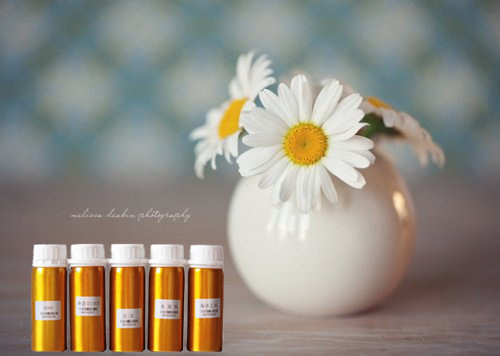

Diffuser User Manual
One, Product Introduction
This product is a timer-controlled automatic fragrance dispensing device, suitable for use in hotels, entertainment venues, nightclubs, and other similar environments.Karaoke TVCar4SThe store, clothing store, beauty and leisure entertainment venues, bank office exhibition hall and other environments provide continuous fresh air, ensuring a comfortable environment for customers.
Two, Product Appearance
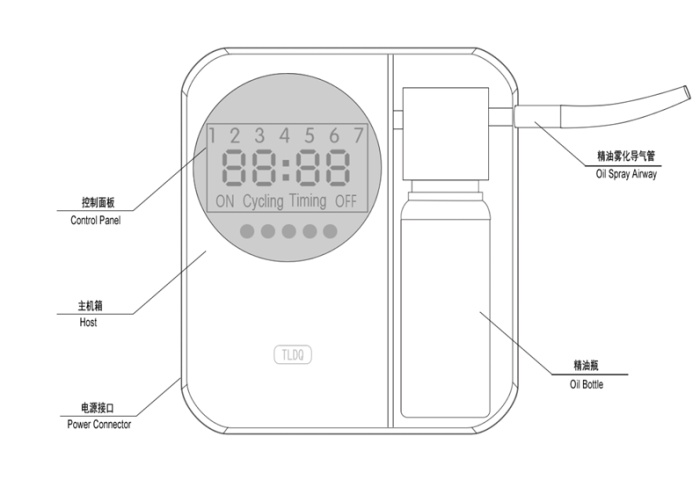

Now the button sequence isMDOE SET UP DOMN Total time
Cycling"change toCycle,
Steps
1. Power adapter
Insert the power cord into the device's side power connector, then plug the plug into the wall outlet. At this point, the screen will light up with content.
2. Set working hours
This device allows for the setting of two operational periods, and it can be configured to operate on weekdays based on multiple options.
[MODE]:Work cycle selection, two-phase working period scheduling, and the function of cycle on-off switching, as follows:
Note: The end time must be later than the start time for the setting to be effective.
SET:Enter the setting mode. For example, time setting, day of the week setting, etc. Note: Long press this button to reset the machine.
UP:Adjust slightly up. Adjustable time data, fragrance data, and work date selection.
Down:Adjust downwards. Adjustable time data, fragrance data, and work date selection.
[Total time]:Press this button to display how long the machine has been working, which is convenient for replacing the essential oil. Press this button again to turn it off.UPKey. Can clear the machine's working time.
3. Set system time
Adjust the device time to make it consistent with the local time, and the system time is 24-hour format.
First PressSETKey, the hour digit of the time period flashes, press[UP/DOWN]Adjust the hour; Press again for the second time.SETKey, hour setting completed, minute digits flashing, setting minutes, press[UP/DOWN]Adjust; Press for the third time.SETKey, minute setting complete, current working day ticking, set working days, press[UP/DOWN]Adjust; Press for the fourth time.SETKey, confirm that the system time has been set.
4. Set the operating hours
1Long pressMississippi Department of EducationKey3Second, interface1.2.3.4.5.6.7The light blinks, pass through.UP/DOWNSwitch to select working cycle. Press after selecting.MODEKey orSETKey interface display1”Enter the first section of the timer setting, press SETKey, interface display ""00:00”clock00”and flicker at the same timeTiming ONThe light turns on. PressUP/DOWNAdjust the machine's clock when the machine is turned on." When the adjustment is complete, press the "key.SETKey, interface shows minutes"00”In flickering, throughUP/DOWNAdjust the 'Minutes' to set the power-on time, and then press 'OK' once you're finished adjusting.SETKey";
Set machine shutdown time, interface display "00:00”clock00”and flicker at the same timeTiming OFFThe light turns on. PressUP/DOWNAdjust the machine's shutdown clock by pressing the 'Time' key, and then press 'OK' after adjusting to confirm.SETKey, interface shows minutes"00”In flickering, throughUP/DOWNAdjust the shutdown time by pressing the 'Minutes' key, and then press 'OK' after adjusting to confirm.MODEPress the key to enter the second section, and the timed operation of the second section is the same as that of the first section.
Note: The end time must be later than the start time for the setting to be effective.
5. Set Concentration
After setting the fourth time period, continue to press[MODE]直到液晶屏上出现Cycle ONSet the machine working time for each fragrance cycle, from 5 seconds to 1800 seconds, press [UP/DOWN] You can adjust by 5 seconds at a time.
Continue to press[MODE]直到液晶屏上出现Cycle OFFSet the machine stop time for each fragrance cycle, from 10 seconds to 900 seconds, press [UP/DOWN] You can adjust by 10 seconds at a time.
Three, Special Note:
1. The installation backboard has anti-theft screw holes. Please install anti-theft screws when installing to prevent the theft of essential oils.
2. The diffuser has a programmable control system that allows for different working days, different working hours, and concentration adjustment to meet the concentration needs of different users and different space scenarios.
3. When replacing the essential oil, you can pull up the essential oil guide tube to facilitate the disassembly or installation of the essential oil bottle.
Update time:


TOP


