
Search history
Clear allSearch by image
XDrag and drop an image here or upload an image
Max 5MB per image
UploadSign In | Join

Search history
Clear allSearch by image
XDrag and drop an image here or upload an image
Max 5MB per image
UploadSign In | Join
Rongyue beauty tools 3yr.
Contacts Lee Chat
Mobile 13305891974
WeChat 13362998253
WhatsApp 8615392033619
86 + 15392033619
WeChat: 15355350932
WeChat: 15392033619
Shop address: 2nd Floor, Door 22, No. 9 Street, Area F2-13554, Yiwu International Commerce City, Yiwu City, Jinhua City, Zhejiang Province
Miss Li 18958493554
15392033619 Mr. Li
Our company provides a complete WiFi signal strength collection scheme, including WiFi signal collection, remote management platform for equipment, and intelligent terminal applications.
DOIT Repeater, also known as a repeater, is used to expand the coverage of WiFi signals.Connecting to a repeater allows you to surf the internet, browse web pages, and watch videos just like connecting to a router.
Features:
1. Realize the WiFi repeater function, after the mobile phone is connected to the device, it can normally surf the Internet like connecting to a router.
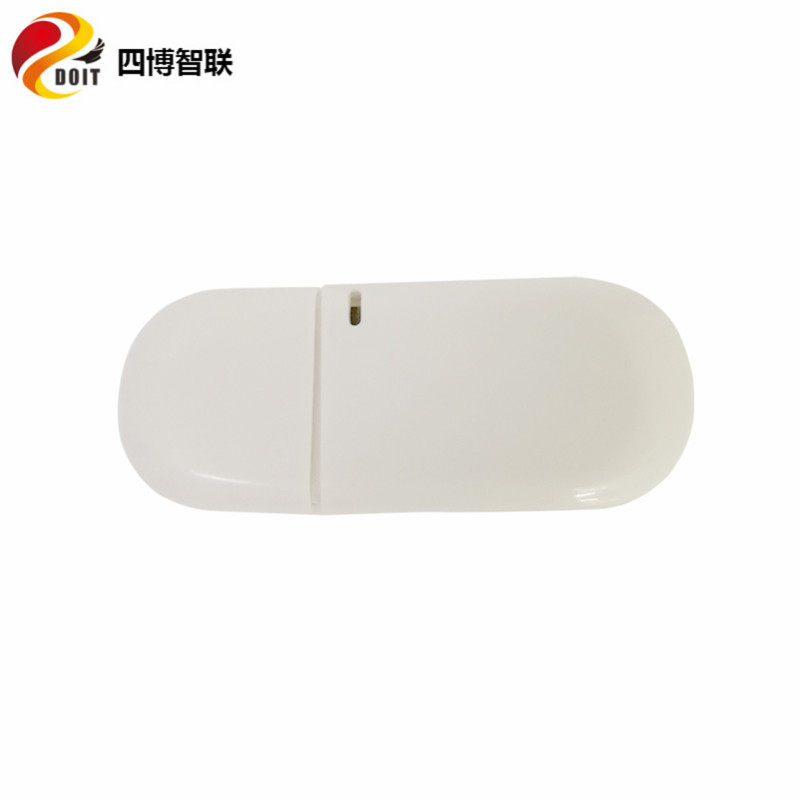
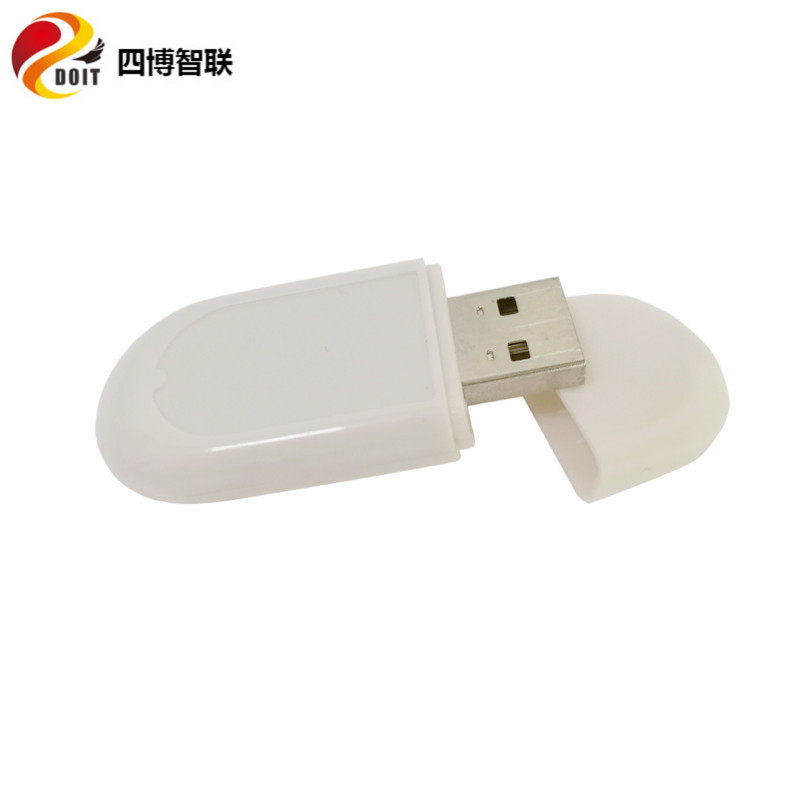
2. Compact in size, the size of a USB flash drive, easy to carry, plug and play
3. Multiple stages can be cascaded to expand the WiFi signal coverage, but the bandwidth will decrease when multiple stages are cascaded. The bandwidth is within 1MB/s.
Low cost, high value for money
5. Network setup is simple and user-friendly.
WiFi Repeater (中继器) Configuration and Usage Method:
First Use
1. Power on the equipment (using a power bank, a computer, a USB power supply, or even a mobile phone);
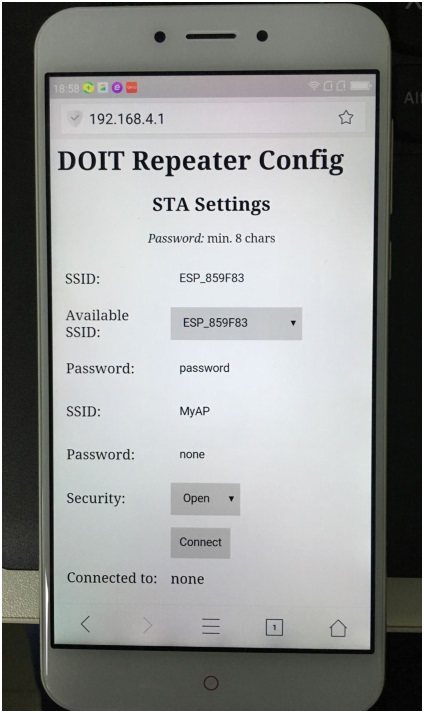
2. Turn on the mobile phone WiFi, connect to the hotspot MyAp (the SSID is the default name set by the factory, which can be modified in the Config page), as shown in the figure below.
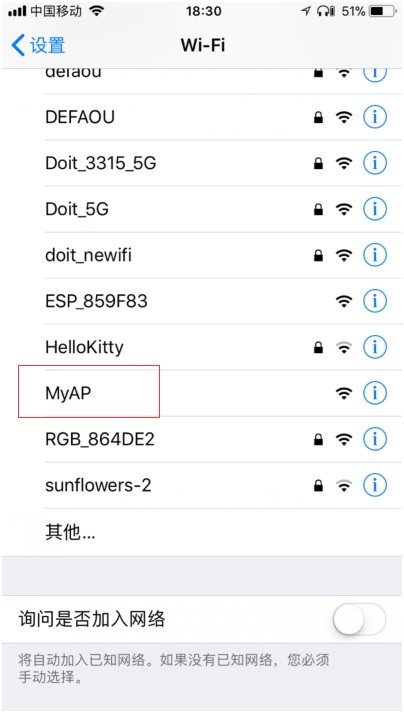
3. Connecting to the hotspot will automatically pop up the setup interface.
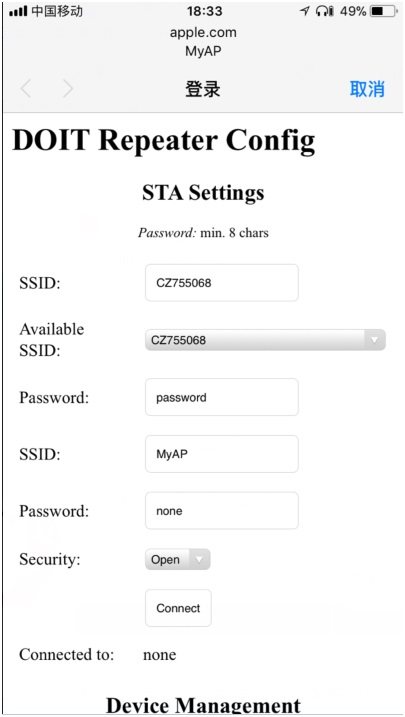
Or open any web page in a browser to enter the setting interface (some Android phones may not automatically pop up the setting interface, in this case, you can use the browser to open the setting interface), as shown in the figure;
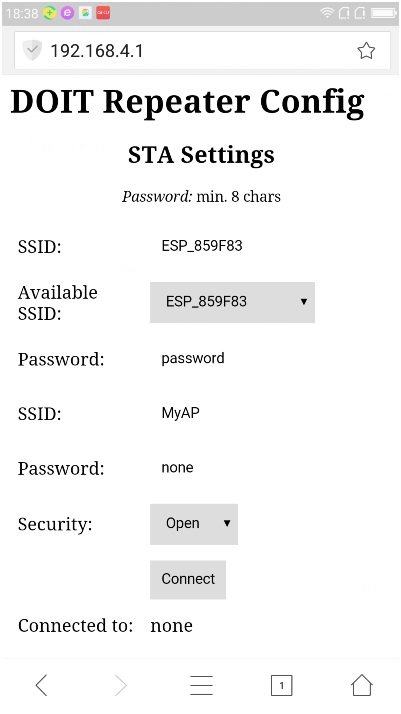
4. In the drop-down list of Available SSID, it lists the SSIDs of the surrounding routers that the module has scanned. Here, select the SSID of the router you want to connect (refreshing the page in the browser will re-scan the router). After selecting it, the SSID column will display the current selected router. Enter the password of the selected router in the Password column. The second SSID represents the AP (Access Point) SSID of the router itself (WiFi module), which can be filled with custom characters. The second Password represents the connection password of the AP. Security indicates whether the router of the repeater is set with a password. When selecting Open, it means that no password is needed to connect. The Connected to field indicates whether the device is currently connected to a router. For example, as shown in the diagram below, the device is already connected to a router named Doit.
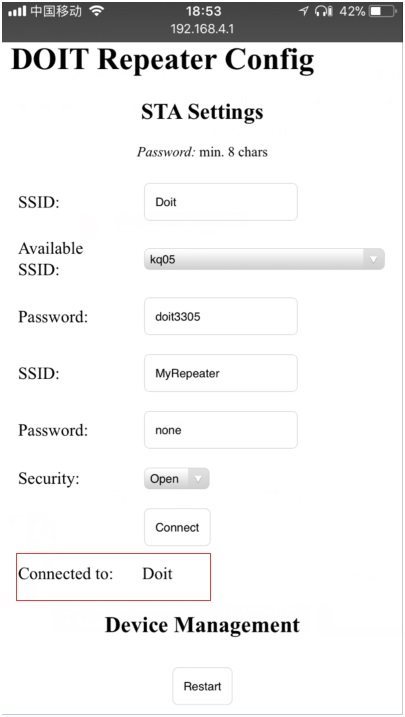
After setting the above options, clicking the Connect button saves the settings and then restarts the device. After the restart, the phone can connect to the repeater's SSID to surf the internet normally. The Restart button indicates the restart of the device.
2. Reuse
1. Switch the device on and off three times (i.e., plug and unplug the device) to re-enable the configuration hotspot. If the switch occurs twice within a 10-second interval, the count resets after 10 seconds.
Effect Preview
Attention:
1. Each time the interval between plugging and unplugging cannot exceed 10 seconds. If the interval time exceeds 10 seconds, it will be counted again.
2. If the device does not automatically pop up the setting interface, please open the mobile browser and any connection can enter the setting interface; still can not enter, try to use the browser to access the address http://192.168.4.1
Update time:


TOP


