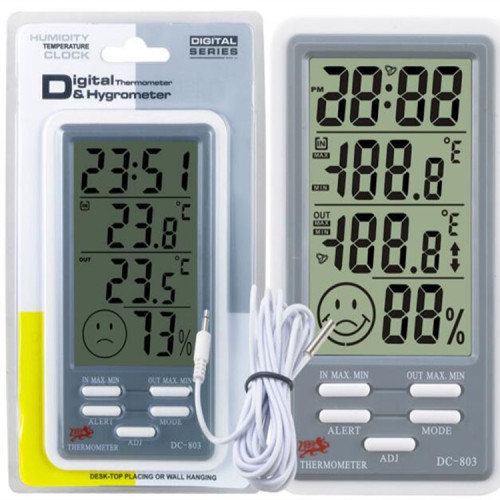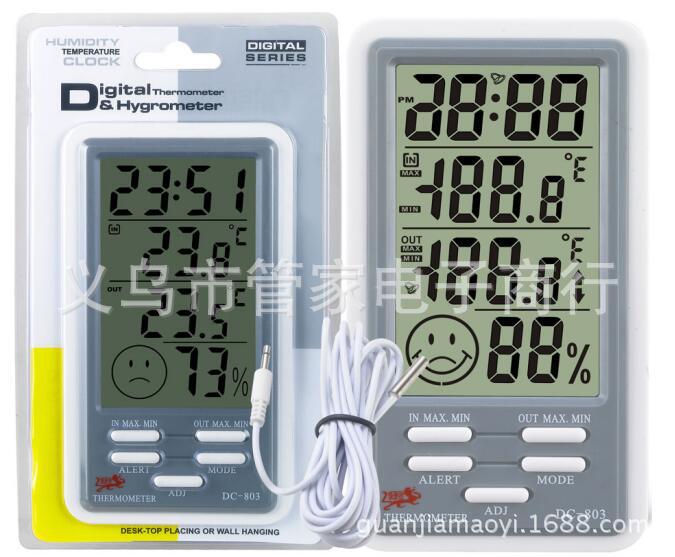
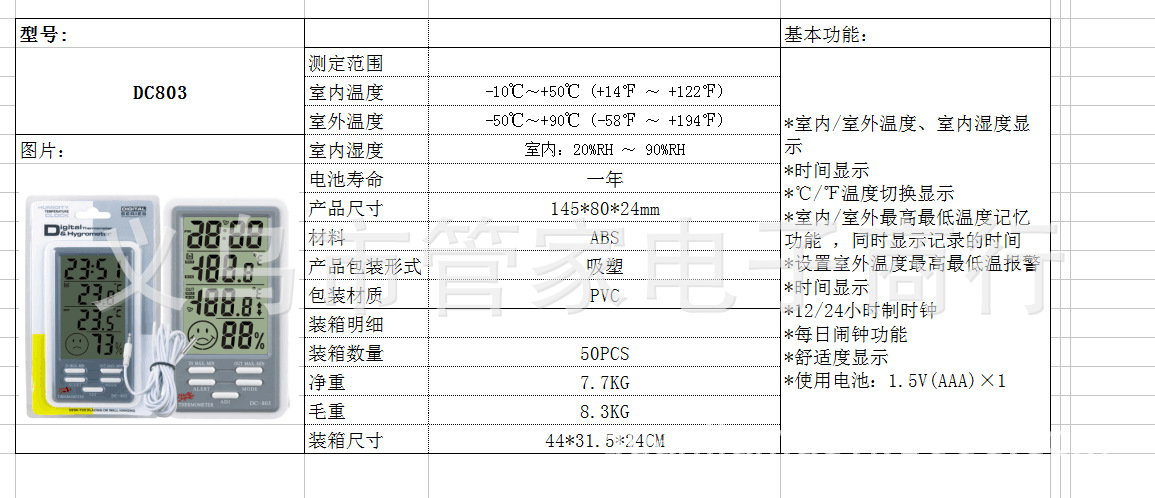
Basic functions:
Indoor/Outdoor Temperature (Simultaneously Displayed)、Indoor Humidity Display
Time Display
Celsius/Fahrenheit temperature switch display
Indoor/outdoor maximum and minimum temperature memory function, simultaneously displays the recording time.
Set the highest and lowest temperature alarm for outdoor temperature
Time Display
12/24-hour clock
Daily Alarm Function
Comfort Display
Temperature measurement range:
Indoor temperature: -10℃~50℃ (14℉~122℉), accuracy: ±1℃
Outdoor temperature: -50℃~90℃ (-58℉~ 194℉), accuracy: ±1℃
Humidity measurement range: 20%RH~90%RH, accuracy: ±5%
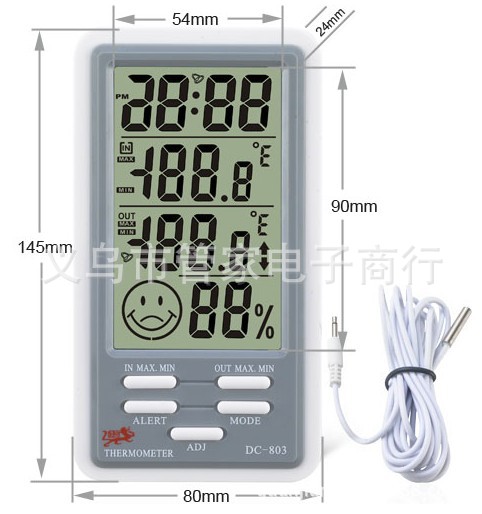
Dimensions: 145 x 80 x 24 mm
Battery: 1.5V (AAA) x 1
Probe line length: 200cm
DC803 Operator's Manual
Temperature measurement range:
Indoor: -10°C to 50°C (14°F to 122°F)
Outdoor: -50°C to 90°C (-58°F to 194°F)
Humidity measurement range: 20%RH~90%RH (When the ambient humidity is lower than 20%RH, it will directly display 10%RH)
Battery: 1.5V (AAA) x 1
Clock, indoor temperature, outdoor temperature, indoor humidity display
Outdoor high and low temperature alarm function, range: -50℃~90℃ (-58℉~194℉)
Celsius/Fahrenheit Switch Display
Clear the MAX value at 8:00 AM every day, and clear the MIN value at 8:00 PM every day.
Indoor/outdoor temperature memory function with the highest and lowest temperature, and simultaneously displays the recording time.
Comfort Display
Comfort Range: Display a smiling face when the indoor temperature is between 18℃ and 25℃ (64℉~77℉) and the indoor humidity is between 40%RH and 65%RH, and display a normal face shape in other ranges.。
Section Three: Operating Methods
- Push the battery cover in the direction indicated on the back of the machine, remove the battery spacer, then replace the battery cover, and the machine is ready to use.
- Clock setting: Press the MODE key for 2 seconds in the initial state to enter the setting, press the ADJ key to select 12/24-hour format, then press the MODE key to confirm and enter the hour setting. Press the ADJ key to adjust the hour number, then press the MODE key to confirm and set the minutes, year, 'Month (M)' and 'Day (D)' separately. When the setting is complete, pressing the MODE key can return to the current clock display mode.
- Alarm function setting: Press the MODE key to enter the alarm mode, and press the ADJ key to turn on/off the alarm switch. Press the MODE key for 2 seconds to enter the alarm (AL) hour setting, press the ADJ key to adjust the hour number, and then press the MODE key to confirm and enter the minute setting. Press the ADJ key to adjust the minute number, and then press the MODE key to confirm and return to the clock mode.
- Alarm Setup: In the outdoor temperature display mode, press the ALERT key to enter the outdoor high temperature (↑) / low temperature (↓) setting. At this time, press the ADJ key once to turn on (appears with a small speaker icon) / turn off the alarm. When the high temperature / low temperature alarm is turned on, press the ALERT key for 2 seconds to enter the high temperature / low temperature alarm setting state. Press the ADJ key to adjust, long press to speed up, and then press the ALERT key to confirm the setting.
- When the outdoor temperature is higher than the set highest alarm temperature or lower than the set lowest alarm temperature,The buzzer will emit a warning sound for about 15 seconds, and the alarm switch and the OUT, ↑, ↓ symbols will flash together. Press any key during the alarm to stop the noise, and the flashing will stop at the same time.
- If the current outdoor temperature continues to be higher than the set maximum temperature or lower than the set minimum temperature, a beeping sound will be emitted at each hour to alert, and this warning will continue until the current outdoor temperature is lower than the set maximum temperature or higher than the set minimum temperature, at which point the alarm warning function will be disabled.
- Hold down the ADJ key to speed up the adjustment of the value, ↑ icon represents the high-temperature mode, ↓ icon represents the low-temperature mode.
- In the set state, if there is no operation within 15 seconds, it will automatically return to the clock mode and save the set values.
Press the [INMAX/MIN]/ [OUTMAX/MIN] key to view the maximum and minimum memory values of indoor (IN)/outdoor (OUT) temperature, and display the time of memory, with the memory values flashing. Press the key again to return to the indoor/outdoor temperature display mode.
Attention:
If the machine experiences any problems, please remove the battery for about 2 seconds and then reinstall it.
Please return the 2* batteries to the government's designated location after they are exhausted.
3* Any technical changes will not be notified in advance.
Basic functions:
Indoor/Outdoor Temperature (Simultaneously Displayed)、Indoor Humidity Display
Time Display
Celsius/Fahrenheit temperature switch display
Indoor/outdoor maximum and minimum temperature memory function, simultaneously displays the recording time.
Set the highest and lowest temperature alarm for outdoor temperature
Time Display
12/24-hour clock
Daily Alarm Function
Comfort Display
Temperature measurement range:
Indoor temperature: -10℃~50℃ (14℉~122℉), accuracy: ±1℃
Outdoor temperature: -50℃~90℃ (-58℉~ 194℉), accuracy: ±1℃
Humidity measurement range: 20%RH~90%RH, accuracy: ±5%
Dimensions: 145 x 80 x 24 mm
Battery: 1.5V (AAA) x 1
Probe line length: 200cm
DC803 Operator's Manual
Temperature measurement range:
Indoor: -10°C to 50°C (14°F to 122°F)
Outdoor: -50°C to 90°C (-58°F to 194°F)
Humidity measurement range: 20%RH~90%RH (When the ambient humidity is lower than 20%RH, it will directly display 10%RH)
Battery: 1.5V (AAA) x 1
Clock, indoor temperature, outdoor temperature, indoor humidity display
Outdoor high and low temperature alarm function, range: -50℃~90℃ (-58℉~194℉)
Celsius/Fahrenheit Switch Display
Clear the MAX value at 8:00 AM every day, and clear the MIN value at 8:00 PM every day.
Indoor/outdoor temperature memory function with the highest and lowest temperature, and simultaneously displays the recording time.
Comfort Display
Comfort Range: Display a smiling face when the indoor temperature is between 18℃ and 25℃ (64℉~77℉) and the indoor humidity is between 40%RH and 65%RH, and display a normal face shape in other ranges.。
Section Three: Operating Methods
- Push the battery cover in the direction indicated on the back of the machine, remove the battery spacer, then replace the battery cover, and the machine is ready to use.
- Clock setting: Press the MODE key for 2 seconds in the initial state to enter the setting, press the ADJ key to select 12/24-hour format, then press the MODE key to confirm and enter the hour setting. Press the ADJ key to adjust the hour number, then press the MODE key to confirm and set the minutes, year, 'Month (M)' and 'Day (D)' separately. When the setting is complete, pressing the MODE key can return to the current clock display mode.
- Alarm function setting: Press the MODE key to enter the alarm mode, and press the ADJ key to turn on/off the alarm switch. Press the MODE key for 2 seconds to enter the alarm (AL) hour setting, press the ADJ key to adjust the hour number, and then press the MODE key to confirm and enter the minute setting. Press the ADJ key to adjust the minute number, and then press the MODE key to confirm and return to the clock mode.
- Alarm Setup: In the outdoor temperature display mode, press the ALERT key to enter the outdoor high temperature (↑) / low temperature (↓) setting. At this time, press the ADJ key once to turn on (appears with a small speaker icon) / turn off the alarm. When the high temperature / low temperature alarm is turned on, press the ALERT key for 2 seconds to enter the high temperature / low temperature alarm setting state. Press the ADJ key to adjust, long press to speed up, and then press the ALERT key to confirm the setting.
- When the outdoor temperature is higher than the set highest alarm temperature or lower than the set lowest alarm temperature,The buzzer will emit a warning sound for about 15 seconds, and the alarm switch and the OUT, ↑, ↓ symbols will flash together. Press any key during the alarm to stop the noise, and the flashing will stop at the same time.
- If the current outdoor temperature continues to be higher than the set maximum temperature or lower than the set minimum temperature, a beeping sound will be emitted at each hour to alert, and this warning will continue until the current outdoor temperature is lower than the set maximum temperature or higher than the set minimum temperature, at which point the alarm warning function will be disabled.
- Hold down the ADJ key to speed up the adjustment of the value, ↑ icon represents the high-temperature mode, ↓ icon represents the low-temperature mode.
- In the set state, if there is no operation within 15 seconds, it will automatically return to the clock mode and save the set values.
Press the [INMAX/MIN]/ [OUTMAX/MIN] key to view the maximum and minimum memory values of indoor (IN)/outdoor (OUT) temperature, and display the time of memory, with the memory values flashing. Press the key again to return to the indoor/outdoor temperature display mode.
Attention:
If the machine experiences any problems, please remove the battery for about 2 seconds and then reinstall it.
Please return the 2* batteries to the government's designated location after they are exhausted.
3* Any technical changes will not be notified in advance.