
Search history
Clear allSearch by image
XDrag and drop an image here or upload an image
Max 5MB per image
UploadSign In | Join

Search history
Clear allSearch by image
XDrag and drop an image here or upload an image
Max 5MB per image
UploadSign In | Join
Because of focus, so professional
 Hello! Thank you for your visit!
Baby detail pictures 宝贝大小
宝贝大小
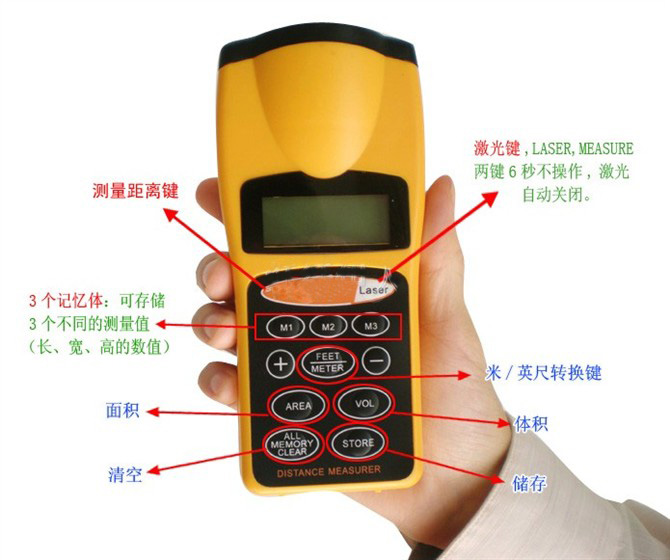
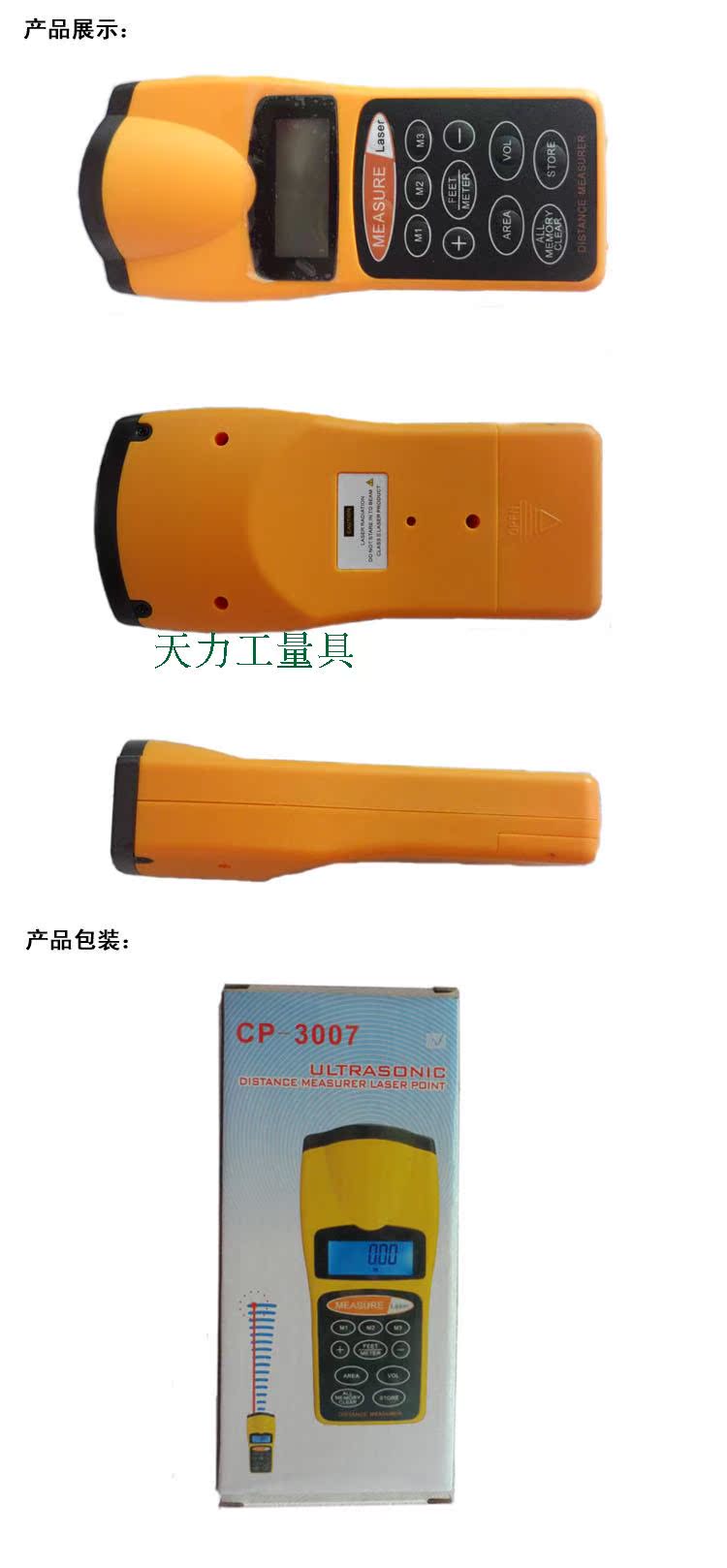
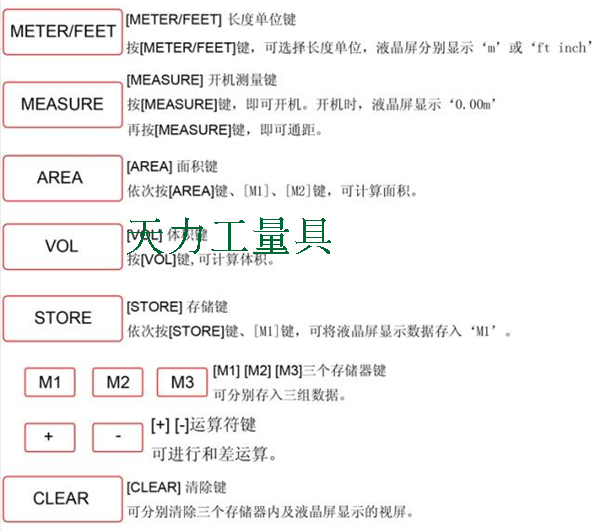

Dear, the battery is a 9V block battery used in remote control car controllers. It is available in supermarkets and is not expensive. If you buy the machine plus the battery, we will only charge you the cost price.

Add a tape measure, please select a set meal; the 3-meter and 5-meter styles are the same.
FeaturesUltrasonic distance measurer is a completely necessary and required tool for home decoration, calculating area and volume when buying air conditioners, real estate agents, or construction workers. It is a fast measurement tool for measuring room and room area. The ultrasonic distance measurer can measure the straight-line distance from 0.50M to 18M. (1.5 feet to 60 feet). The ultrasonic distance measurer uses the principle of sending ultrasonic waves to the measured object and then calculating the round-trip time of the ultrasonic waves to determine the measurement distance.
Product Parameters:
Measurement range: 50 cm to 18 meters
Error: About 10%.
Resolution: 0.01 meters
Maximum measuring distance: 18 meters
The sum of the maximum distances: 180.00 meters
Maximum computing area: 18×18 square meters
Maximum Computed Volume: 1800.0 cubic meters
Battery: 9v
Frequency: 40kHz
Accuracy: ±0.5%
Resolution: 0.01m
Working temperature: 0°C ~ 50°C
Export products, English instructions!
Measurement Notes:
1.The ultrasonic distance meter measures the distance to the obstacle from the bottom of the machine, not the top distance.
2. Measure the body and the wall as vertically as possible, especially when the measured distance is far, the more vertical, the higher the accuracy of the measurement data, on the contrary, the larger the angle, the larger the error. When measuring a long distance, it is recommended to open the laser positioning to maintain the vertical as much as possible.
Please install the battery according to the following steps:
1. Place according to the direction of the arrow in the battery compartment.
2. The lid is pushed to slide open, and there are positive and negative (+ and -) poles in the battery compartment.
3. Open the lid
4. When the device shows low battery or the rangefinder is not working, please replace the battery.
Switch for using the rangefinder:To turn on this instrument, please press the "MEASURER" button.Measurement time:
1. Please press the "MEASURE" button, and the radar of this instrument will measure the distance to the other end.
2. Place the instrument's base against the wall, roughly at the height of the ceiling to the floor. Ensure there are no obstructions between the distances you are measuring, and keep your head or hands out of the way of the measuring instrument.
3. Press 'FEET' or 'METER' repeatedly. 'FEET' indicates measuring in feet, or 'METER' indicates measuring in meters.
Explanation:
The display of the measuring instrument usually takes about 30 seconds, and it will also take about 30 seconds if you change to another mode.
If the range you measure is less than 2 feet (0.5 meters) or greater than 60 feet (18.288 meters), it will display 'ERROR'.
Measurement Secrets:
Some curtains can absorb sound waves, leading to inaccurate measurements. If you are measuring in a room with curtains, please move the curtains to the other side of the window and close the window.
If there are obstacles in the measured distance, the data measured by ultrasound is incorrect, such as tables, chairs, or other obstacles. If you are unsure whether your measurement is correct, then measure from different angles multiple times.
If you measure a place that is not flat or a very narrow corner, the data you obtain will be inaccurate.
If the distance to be measured is greater than 60 feet (18.288 meters), then choose a point in the middle of the house, for example: measure from the middle to each side, and then add them up.
Reduce measurement errors.
1. Measure the size using these steps.
2. Press the "STORE" button, and you can store the measured data in the memory card M1, M2, or M3.
3. If necessary, repeat the first and second steps above to store data.
4. If you want to store the data in a specific memory card, press M1, M2, or M3. Then the data will be stored in the card.
5. If you want to store new data, you can simply delete the original data.
6. If you want to delete all the data, press 'ALL MEMORY CLEAR' for 3 seconds, and all the data, including M1, M2, M3, will temporarily disappear.
Note: Deleted dates and sounds cannot be saved.
Measure volume:
thinkmeasureMeasure the sound effect of the house first by measuring its height, width, and length, and then store each data to different memory cards. Please see 'Saving a Measurement', and then press 'VOLUME', and the calculation and storage of the sound effect will be displayed.
Measure area:
Find two empty storage spaces according to the following steps:
1. The height and width measurements are stored on the memory card of M1 and M2. Press 'AREA', 'M1', and 'M2', and the data will be stored.
The storage of addition, subtraction, multiplication, and division:
1. Measure any two dimensions and save them in M1 and M2.
2. Press the 'ALL MEMORY CLEAR' key.
3. Press 'M1' plus 'M2' plus any other data to be added, or press 'M1' minus 'M2' minus any data to be subtracted, and the data to be added or subtracted will appear.
4. If you want to store additional data or if you want to clear the memory, just press "ALL MEMORY CLEAR".
Update time:


TOP


