Search history
Clear allSearch by image
XDrag and drop an image here or upload an image
Max 5MB per image
UploadSign In | Join

Search history
Clear allSearch by image
XDrag and drop an image here or upload an image
Max 5MB per image
UploadSign In | Join
Thermal sublimation material factory 5yr.
Contacts Chen Chat
Mobile 86-13355334565
E-mail lipengtaoci@126.com
WeChat 13388459855
Inkjet printing heat transfer paper for light colors, suitable for any material cotton or cotton-containing fabrics.T-shirt heat transfer paper for light colors
Transfer patterns onto white or light-colored fabrics.
Instructions are as follows:You need:
1. T-shirt heat transfer paper
2. Inkjet printer
3. Iron (do not use steam function) or heat transfer machine
4. White or pink T-shirts, baseball caps, shorts, cotton mouse mats, handkerchiefs, and other cotton fabrics.
Print:
1. Suggest setting the printer to the 'Photo Quality Inkjet Paper' mode for photo-quality printing results.
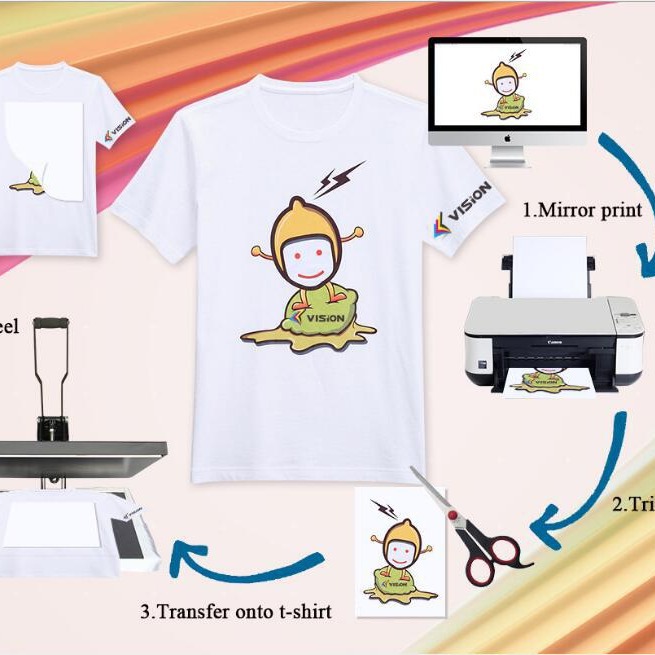
2. After selecting the color and size of the printing pattern, please set the mirror printing, and print the pattern on the heat transfer paper.
The correct use of the printing side (printing side). Our transfer paper has no requirements for ink, and it can be used with any brand.
Common dyes, ink, pigment inks, etc.
3. Allow the transferred paper to dry completely after printing, cut out the images you need, ensuring that the edges of the surrounding patterns are at least 5 millimeters.
烫印转印
1. Press the fabric that needs heat transfer printing flat, and place the printed side of the heat transfer paper on the position where the heat transfer printing is needed.
Please set the transfer temperature to about 180°C, the heat transfer machine's printing time to 25 seconds, and the transfer paper to be printed on the clothing.
After the fitting, place it under the press plate and it's ready to go.
3. If using a iron, please preheat to the high setting temperature (approximately 2-3 minutes), do not use the steam function!
When heat transfer printing, move slowly and press down firmly, making sure to cover every corner and edge.
Update time:


TOP